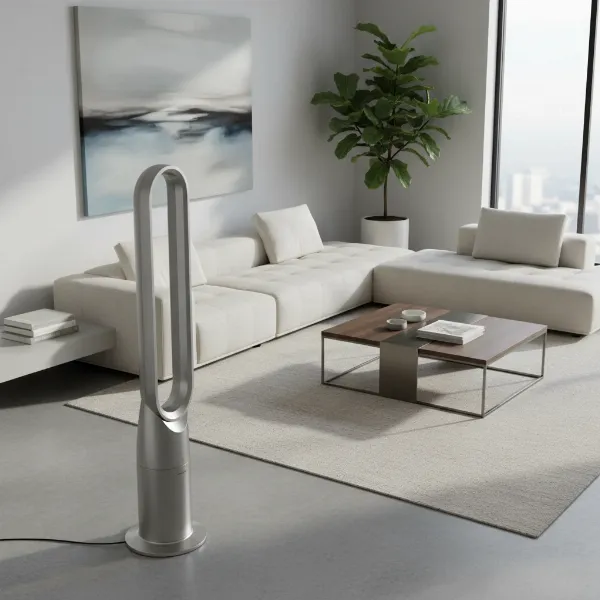
The gentle hum of an electric fan is often a comforting sound, a promise of cool relief on a warm day. But what if that familiar hum is replaced by a struggling whir, or worse, a noticeable heat radiating from the motor? An overheating electric fan motor isn’t just an inconvenience; it can be a sign of underlying issues that, if ignored, could lead to reduced efficiency, a shorter fan lifespan, or even a fire hazard. This comprehensive guide is designed to empower you with the knowledge to diagnose the common causes of electric fan motor overheating, walk you through practical troubleshooting steps, and help you implement preventative measures to ensure your fan provides consistent, cool comfort for years to come.
Understanding Fan Motor Overheating
Electric fan motors convert electrical energy into mechanical energy to spin the blades, moving air. However, this process isn’t 100% efficient; some energy is always lost as heat. Under normal operating conditions, this heat is dissipated naturally by the motor’s design and the airflow it generates. An overheating motor occurs when the heat generated exceeds the motor’s ability to cool itself, leading to a dangerous temperature buildup.
How do you know if your fan motor is overheating? Several tell-tale signs often alert you to a problem. You might notice the motor housing is excessively hot to the touch, or there could be a distinct burning smell, indicative of electrical components or insulation getting too hot. Other symptoms include reduced airflow despite the fan running, unusual noises like grinding or squealing, or the fan spontaneously shutting off, which is often a safety mechanism (thermal protector) preventing severe damage.
Common Causes of Electric Fan Motor Overheating
Identifying the root cause of an overheating fan motor is crucial for effective troubleshooting. Often, the culprits are quite common and can be addressed with simple DIY fixes.
Dust and Debris Accumulation
|
Our Picks for the Best electric fan in 2026
As an Amazon Associate I earn from qualifying purchases.
|
||
| Num | Product | Action |
|---|---|---|
| 1 | Dreo Tower Fan for Bedroom, 90° Oscillating Standing Fans for Room with 4 Speeds, 3 Modes, 28dB Quiet for Sleep, 25ft/s Velocity, 8H Timer, Remote, Living Room, Office, Home, Black |

|
| 2 | 10\" Modern Standing Fan for Bedroom, Sleek Oscillating Pedestal Fan, 3-Speed & Height Adjustable Compact Floor Fan for Home Office & Dorm |
|
| 3 | Dreo Tower Fan for Bedroom, 25ft/s Velocity Quiet Floor Fan, 90° Oscillating Fans for Indoors with 4 Speeds, 4 Modes, 8H Timer, Standing Fans, Bladeless Fan, Black, Nomad One (DR-HTF007) |
|
| 4 | Amazon Basics Air Circulator Fan, Desk Fan for Bedroom, Home and Office, With 90-Degree Tilt Head, 3 Speed Settings, Lightweight (3 LBS), 35 Watts, Black, 11.1\"W x 6.3\"D x 10.9\"H |
|
| 5 | Amazon Basics 16\" Pedestal Fan with Remote, Floor Fan, Standing Fan for Bedroom, Living Room, Office, with 3 Speeds, 3 Modes, Timer, Dual-Layered Blades, Adjustable Height, Tilt Head, 60W, Black |
|
| 6 | Lasko 2520 Oscillating Stand Fan,White 16 Inch |
|
| 7 | Dreo Fan for Bedroom, 120° Oscillating Standing Fans, Quiet Floor Fan with DC Motor, 100ft Pedestal Fans for Room, 9 Speeds, 4 modes, 20dB, 120° Manual Vertical, 37-42\" Adjustable Height, 9H Timer |
|
| 8 | LEVOIT Tower Fan for Bedroom, 25ft/s Velocity Standing Fan with 28dB Quiet for Sleep, Remoter, 12H Timer, 5 Speeds, 4 Modes, 90° Oscillation for Home, Office, Indoor, Bladeless 36 inch, White |
|
| 9 | Amazon Basics 20\" High Velocity Industrial Fan, Floor Fan, with 3 Speeds, Tilt Head, ETL-Listed Safety Compliance, Metal Housing/Blades, Ideal for Industrial/Commercial Space/Garage/Gym, 125W, Black |
|
| 10 | Dreo Fan for Bedroom, 12 Inches, 70ft Powerful Airflow, 28db Quiet Table Air Circulator Fans for Whole Room, 120° Adjustable Tilt, 3 Speeds, Desktop Fan for Home, Office, Kitchen |
|
Over time, dust, lint, and pet hair can accumulate on fan blades, motor housing, and especially within the motor’s ventilation vents. This buildup acts as an insulator, trapping heat around the motor. It also adds resistance, forcing the motor to work harder and draw more current to spin the blades, which generates even more heat.
Lack of Lubrication or Worn Bearings
The moving parts within your fan motor, particularly the bearings or bushings, require proper lubrication to operate smoothly. If these components dry out or wear down, increased friction occurs. This metal-on-metal contact generates significant heat and can cause the motor to labor, leading to overheating.
Blocked Airflow or Ventilation Issues
Just like any machinery, fan motors need adequate airflow to dissipate heat. If the fan’s intake or exhaust vents are blocked—whether by dust, a nearby wall, or other objects—hot air gets trapped around the motor. This prevents the motor from cooling down effectively, leading to a rapid rise in temperature.
Continuous Operation and Exceeding Duty Cycle
While fans are designed for extended use, continuous operation at high speeds, especially in warm environments, can push a motor beyond its intended “duty cycle.” Motors rated for intermittent duty, which means they need cool-down periods, will quickly overheat if run constantly. Even continuous-duty motors can struggle if not given an occasional break.
Electrical Issues
Various electrical problems can cause a fan motor to overheat. These include an improper voltage supply (too high or too low), an electrical overload where the motor draws too much current, or a short circuit within the motor windings. A faulty capacitor, which helps start the motor and maintain its speed, can also cause the motor to struggle and overheat.
Motor Defects or Aging
Like any mechanical device, electric fan motors wear out over time. Components can degrade, windings can become less efficient, or internal connections can weaken. An older motor naturally becomes less efficient at converting electricity into mechanical motion, resulting in more energy being converted into waste heat.
Damaged Fan Blades
Bent, cracked, or missing fan blades can disrupt the balance of the fan and reduce its ability to move air efficiently. A motor struggling to spin imbalanced or ineffective blades will exert more energy, leading to increased heat generation and potential overheating.
High Ambient Temperature
The external environment plays a significant role in motor cooling. If a fan operates in an already hot room or direct sunlight, the motor has a harder time shedding its heat. The ambient temperature can contribute to the motor reaching critical overheating levels more quickly.
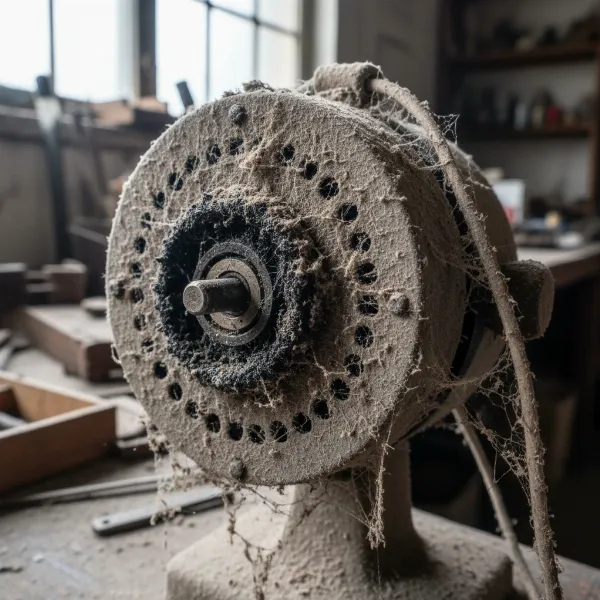 Close-up of a dusty electric fan motor with accumulated grime causing overheating
Step-by-Step Troubleshooting for an Overheating Electric Fan Motor
When your electric fan motor starts to overheat, don’t panic. Many issues can be resolved with a methodical approach. Always prioritize safety before starting any inspection or repair.
Safety First: Unplugging the Fan
Before you touch any part of your electric fan, immediately unplug it from the power outlet. This crucial step prevents electrical shock and accidental activation during your troubleshooting process. Never attempt to clean, inspect, or repair a fan while it is still plugged in.
Visual Inspection
Once unplugged, perform a thorough visual inspection. Look for obvious signs of dust and debris buildup on the fan blades, motor housing, and especially around any visible vents or grilles. Check for any physical damage to the fan blades, such as cracks or bends, and ensure they are securely attached to the motor shaft.
Thorough Cleaning
Dust and dirt are frequent culprits behind overheating.
- Disassemble: Carefully remove the front grille, then the fan blade assembly. Many fans have a retaining nut or cap that needs to be unscrewed.
- Clean Blades: Wipe the fan blades with a damp cloth to remove accumulated dust and grime.
- Clean Motor Housing and Vents: Use a soft brush (like an old paintbrush) and/or compressed air to dislodge dust from the motor housing, cooling vents, and any internal components you can safely reach. Avoid using water on electrical parts. This step significantly improves the motor’s ability to dissipate heat.
Lubricating Bearings
If your fan motor has accessible lubrication ports (often small holes near the motor shaft), apply a few drops of light machine oil (such as 3-in-1 oil or electric motor oil). Avoid using penetrating oils like WD-40, as they are not designed for long-term lubrication. If the bearings are sealed or inaccessible, or if the problem persists, worn bearings might require professional replacement.
Check for Obstructions
Ensure that nothing is physically impeding the rotation of the fan blades or blocking the airflow through the motor’s vents. This includes loose wires, fallen objects, or external debris. The fan should be placed in an area with good air circulation, away from walls or furniture that could obstruct its vents.
Listen for Unusual Sounds
Carefully rotate the fan blades by hand (with the fan unplugged). Do you hear any grinding, squealing, or excessive friction? These sounds can indicate worn or unlubricated bearings. After cleaning and lubricating, plug the fan in briefly and listen during operation. Persistent loud, abnormal noises typically point to internal motor issues.
Assess Motor Health
After cleaning and brief operation, if the motor still feels excessively hot or smells burnt, it suggests a more serious internal problem. A burning smell often indicates damaged motor windings, which can be a safety hazard. If the motor repeatedly shuts off, its thermal protector is likely engaging due to extreme heat.
Consider Professional Help
For complex electrical issues, motor winding damage, or when you’re unsure about disassembling or repairing internal components, it’s best to consult a qualified electrician or appliance repair technician. Attempting repairs beyond your skill level can be dangerous and cause further damage.
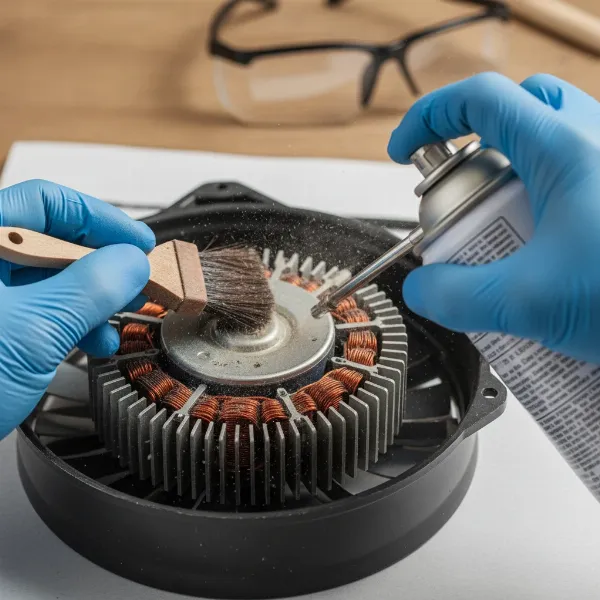 Person cleaning an electric fan motor to prevent overheating with a brush and compressed air
Preventative Maintenance for Fan Longevity
Regular maintenance is key to preventing fan motor overheating and extending the lifespan of your electric fan. A little proactive effort can save you from inconvenient breakdowns and potential replacement costs.
- Regular Cleaning Schedule: Make it a habit to clean your electric fan, particularly the blades and motor housing, at least every 2-3 months. For fans used in dusty environments or those with pets, more frequent cleaning (e.g., monthly) is advisable. This prevents the buildup that obstructs airflow and strains the motor.
- Optimal Placement for Airflow: Position your fan in an area where its air intake and exhaust vents are unobstructed. Avoid placing it directly against a wall, in a very confined space, or where it might draw in excessive dust and debris. Good air circulation around the fan itself helps the motor stay cool.
- Avoid Overuse: While modern fans are robust, giving them occasional breaks, especially during prolonged use at high speeds, can help prevent overheating. If you notice the motor getting particularly warm, turn it off for a while to allow it to cool down completely.
- Proper Storage: When the cooling season ends, clean your fan thoroughly before storing it. Cover it with a cloth or place it back in its original packaging to protect it from dust accumulation during the off-season.
When to Repair or Replace Your Electric Fan
Deciding whether to repair an overheating fan or replace it depends on several factors, including the severity of the damage, the fan’s age, and the cost of repair versus replacement.
- Cost-Benefit Analysis: If the repair cost, including parts and labor, approaches or exceeds the price of a new, comparable fan, replacement is often the more economical choice.
- Severity of Damage: Minor issues like dust buildup or lack of lubrication are typically inexpensive to fix. However, significant motor damage, such as burnt windings or a seized motor, can be costly to repair and might not guarantee long-term reliability.
- Age of the Fan: Older fans, particularly those beyond their typical lifespan (which can vary but is often 5-10 years for many electric fans), might develop multiple issues. Investing in repairs for an aging fan could be a continuous cycle of problems.
- Safety Concerns: If the fan repeatedly overheats, emits a burning smell, or poses an electrical hazard even after minor repairs, it’s safer to replace it entirely. Your safety and the safety of your home should always be the top priority.
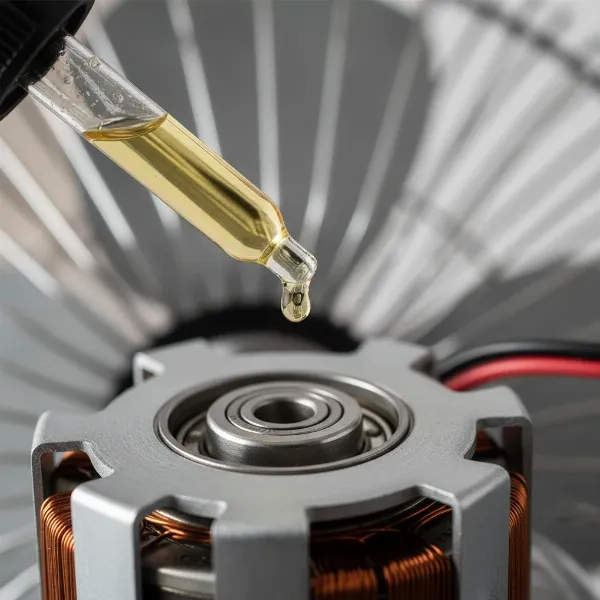 Applying oil to electric fan motor bearings for smooth operation
Common Fan Motor Overheating Symptoms and Solutions
| Symptom | Possible Cause | Suggested Solution |
|---|---|---|
| Fan feels excessively hot to touch | Dust accumulation, lack of lubrication, motor overload | Unplug, clean thoroughly (blades, vents, motor), lubricate bearings if accessible. Check for obstructions. Reduce continuous high-speed use. |
| Distinct burning smell | Overheated motor windings, electrical short | Immediately unplug. Do NOT use. This is a fire hazard. Inspect for visible damage. Professional assessment or replacement is strongly recommended. |
| Reduced or weak airflow | Blocked vents, damaged blades, heavy dust buildup | Unplug, clean blades and vents thoroughly. Inspect blades for damage or imbalance; replace if necessary. Ensure fan has clear space around it. |
| Unusual noises (grinding, squealing) | Worn or unlubricated motor bearings | Unplug, clean. If accessible, lubricate bearings with light machine oil. If noise persists or is metallic, bearings may be severely worn and require professional replacement. |
| Fan cycles on and off automatically | Thermal protector tripping due to overheating, overload | Unplug, allow to cool. Clean fan. Reduce load (e.g., lower speed setting). Check for airflow obstructions. If problem persists, it indicates a recurring overheating issue – seek professional advice or consider replacement. |
Conclusion
An overheating electric fan motor can be a puzzling and concerning issue, but with a systematic approach to troubleshooting and regular maintenance, many problems are entirely fixable. By understanding the common causes—from accumulated dust and lack of lubrication to electrical faults and environmental factors—you can take informed steps to restore your fan to optimal working condition. Prioritizing safety, performing thorough cleaning, and knowing when to call a professional or opt for a replacement will ensure your electric fan continues to provide a cool, comfortable environment safely and efficiently. Don’t let a hot motor leave you in the literal or figurative heat; take action today.
What’s the oldest electric fan you’ve successfully brought back to life, and what was the secret to its revival?
Frequently Asked Questions
Why does my electric fan motor get so hot?
Electric fan motors often overheat due to factors such as dust and debris obstructing vents, insufficient lubrication leading to increased friction, continuous high-speed operation, or underlying electrical issues like overloads or faulty components. These issues force the motor to work harder or prevent adequate heat dissipation.
Is it normal for an electric fan motor to be warm?
A slight warmth during normal operation is typical for an electric fan motor as it converts energy. However, if the motor becomes excessively hot to the touch, emits a burning odor, or triggers an automatic shutdown, these are clear indicators of an overheating problem that requires immediate attention.
How often should I clean my electric fan to prevent overheating?
To ensure optimal performance and prevent motor overheating, it is recommended to clean your electric fan, focusing on the blades, motor housing, and vents, at least every 2-3 months. Fans used in particularly dusty environments or homes with pets may benefit from monthly cleaning.
Can I lubricate my electric fan motor myself?
Yes, if your fan motor features easily accessible lubrication ports, you can typically lubricate the bearings yourself using a few drops of light machine oil, such as 3-in-1 oil. Always ensure the fan is unplugged before attempting any maintenance, and consult the manufacturer’s instructions if available.
When should I replace an overheating fan rather than repair it?
Consider replacing an electric fan if the estimated repair costs, including parts and labor, are comparable to or exceed the price of a new fan. Replacement is also advisable for severe damage like burnt motor windings, or if the fan is very old and frequently encounters issues, prioritizing safety and long-term reliability.
What type of oil should I use for fan motor lubrication?
For lubricating electric fan motors, a light machine oil is generally recommended. Products like 3-in-1 oil or specific electric motor oil are suitable. Avoid using thick greases or penetrating oils like WD-40, as they are not designed for the continuous lubrication required by fan motor bearings and can attract more dust.