Few things are as disruptive as an electric fan that rattles, shakes, and vibrates excessively. What starts as a gentle hum can quickly escalate into an annoying noise that spoils your peace and makes you wonder if your trusty appliance is on its last legs. But before you rush to replace it, understand that many common causes of fan vibration can be diagnosed and fixed with a little knowledge and effort. Addressing these issues not only restores quiet comfort but also extends your fan’s lifespan and maintains its efficiency.
Understanding Excessive Fan Vibration
When an electric fan vibrates more than usual, it’s typically a symptom of an underlying mechanical imbalance or a loose component. This isn’t just an audible nuisance; prolonged excessive vibration can lead to increased wear and tear on the motor, premature bearing failure, and even pose a safety risk if parts become too loose. Identifying the root cause is the first step toward a lasting solution.
Common Causes of Fan Vibration
Excessive vibration can stem from several issues, ranging from simple fixes to more complex mechanical problems. Understanding these common culprits can help you pinpoint the problem with your fan.
Unbalanced Fan Blades or Wheel
One of the most frequent reasons for a fan to vibrate is an imbalance in its rotating parts.
- Dust and Debris Buildup: Over time, dust, lint, and grime can accumulate unevenly on fan blades, especially if not cleaned regularly. This uneven weight distribution throws the blades out of balance, causing the fan to wobble as it spins. This is particularly common in desk, pedestal, and ceiling fans.
- Bent or Warped Blades: Accidental impacts, prolonged exposure to heat, or simply age can cause fan blades to bend or warp. Even a slight deformation can significantly impact the fan’s balance, leading to noticeable vibration.
- Manufacturing Defects: Less common, but sometimes blades may have been imperfectly manufactured, leading to an inherent imbalance from the start.
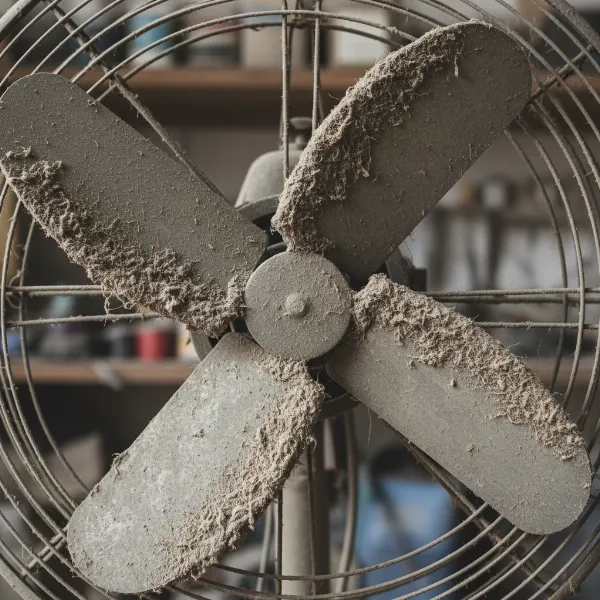 Close-up of dirty fan blades, uneven dust accumulation causing fan vibration.
Loose Fasteners and Mounting Hardware
Just like any mechanical device, fans are held together by an array of screws, bolts, and other fasteners. Over time, due to constant movement and vibration, these can loosen.
- Loose Screws/Bolts: This applies to fan guards, blade attachments, motor mounts, and the fan base itself. A loose screw holding a fan blade to its hub, for instance, can cause that blade to swing unevenly.
- Improper Installation: For ceiling fans, if the mounting bracket or downrod is not securely fastened to the ceiling joist or junction box, the entire fan assembly can wobble. Similarly, a pedestal fan with a loose base will shake.
Worn or Defective Bearings
Bearings allow the fan motor’s shaft to rotate smoothly. When these components wear out or lack proper lubrication, they can become a significant source of vibration and noise.
- Lack of Lubrication: Insufficient grease or oil can cause friction, leading to increased resistance, heat, and eventually, vibration as the metal components grind against each other.
- Wear and Tear: Over years of operation, bearings naturally wear down, developing excessive play or damage. This can manifest as a rattling, grinding, or loud humming noise accompanied by vibration.
Motor or Shaft Misalignment
The motor and the fan’s rotating shaft must be perfectly aligned for smooth operation.
- Improper Installation: If the motor assembly or the fan blades were not correctly seated or aligned during initial installation or after a repair, it could lead to an immediate vibration issue.
- Shifted Components: Over time, components might shift slightly due to prolonged vibration or external forces, throwing the motor shaft out of alignment.
Deteriorated Components
Some fan components, particularly the fan wheel itself in industrial or older residential fans, can deteriorate.
- Material Degradation: Age, exposure to corrosive environments, or general wear can weaken the fan wheel’s structure, causing it to lose its structural integrity and balance. (This is more prevalent in industrial fans handling specific air compositions).
Improper Installation or Placement
Sometimes the fan itself isn’t the problem, but how it’s installed or where it’s placed.
- Unstable Surface: A desk fan or pedestal fan placed on an uneven or flimsy surface can vibrate simply because its base isn’t stable.
- Ductwork Issues (for ducted fans): For bathroom exhaust fans or industrial centrifugal fans, obstructions, restrictions, or imbalances within the ductwork can cause the fan to vibrate due to altered airflow.
Troubleshooting Steps for Different Electric Fan Types
Before attempting any troubleshooting or repair, always ensure the fan is powered off and unplugged from the electrical outlet. Safety is paramount to prevent accidental injury.
General Safety First
Regardless of the fan type, always follow these critical steps:
- Power Off: Turn off the fan using its controls.
- Unplug: Disconnect the fan from its power source. For ceiling fans, turn off the corresponding circuit breaker.
- Wait: Allow all moving parts to come to a complete stop before touching them.
Desk and Pedestal Fans
These fans are typically easier to inspect and fix due to their accessibility.
- Visual Inspection: Look for any obvious signs of damage or loose parts on the blade guard, blades, motor housing, and base.
- Tighten Fasteners: Use a screwdriver to tighten any loose screws on the blade guard, the central cap holding the blades, and the stand/base assembly. Loose retention nuts on the blade shaft are a common culprit for rattling. [cite: Desk Fan 4]
- Clean Blades: Remove the front grille and clean the blades thoroughly with a damp cloth to eliminate dust buildup that might be causing imbalance.
- Check for Bent Blades: Carefully examine each blade for any visible bends or cracks.
- Placement: Ensure the fan is on a flat, stable surface. For additional dampening, consider placing rubber or felt pads under the fan’s base. [cite: Desk Fan 1, 3]
Ceiling Fans
Ceiling fan wobble is a very common complaint, often due to balance issues or loose mounting.
- Check Mounting: Standing on a sturdy ladder, gently shake the fan. If it moves easily where it meets the ceiling, the mounting bracket or downrod screws are likely loose. Remove the canopy cover to access and tighten these. [cite: Ceiling Fan 1, 5]
- Blade Security: Ensure all screws connecting the blades to their holders and the blade holders to the motor housing are tight. [cite: Ceiling Fan 3, 5]
- Clean Blades: Dust and debris can accumulate unevenly on ceiling fan blades, causing imbalance. Clean both sides of each blade thoroughly. [cite: Ceiling Fan 3, 5]
- Blade Warping: Visually inspect each blade for warping or sagging. You can often check alignment by comparing blades to each other or using a measuring tape from the ceiling to each blade tip.
- Balance Kit: If cleaning and tightening don’t resolve the wobble, use a ceiling fan balancing kit. These kits usually include weights and clips to help identify and correct the unbalanced blade. [cite: Ceiling Fan 1, 4]
Exhaust/Bathroom Fans
While often hidden, these fans can also vibrate excessively, typically due to dust, loose parts, or ductwork issues.
- Access: Remove the fan cover/grille.
- Clean Impeller/Blades: Use a brush or vacuum to clean the fan’s impeller (blade assembly) which can get caked with dust and lint, especially in bathrooms.
- Tighten Screws: Check for loose screws holding the motor housing or the fan assembly itself to the ceiling joist or ductwork.
- Ductwork Inspection: Look into the visible ductwork for any obstructions or debris that might be impeding airflow and causing vibrations.
Step-by-Step Solutions to Fix Fan Vibration
Once you’ve identified the potential cause, here’s how to apply targeted solutions.
1. Tighten All Fasteners
- Systematic Check: Go through your fan methodically, tightening every visible screw and bolt. This includes those on the blade guards, the hub that holds the blades, the motor housing, the base (for floor fans), and especially the mounting hardware for ceiling and wall-mounted fans.
- Manufacturer Manual: Consult your fan’s user manual for specific fastener locations and torque recommendations.
2. Clean Fan Blades and Components
- Thorough Dusting: Use a soft cloth, brush, or vacuum cleaner attachment to meticulously clean all fan blades, the motor housing, and any grilles. Pay close attention to the leading edges of the blades where dust tends to accumulate.
- Stubborn Grime: For caked-on grime, a damp cloth with a mild cleaner might be necessary, ensuring the fan is completely dry before reassembly or use.
3. Balance the Fan Blades
This is crucial for wobbling.
- Visual Inspection: First, compare each blade to ensure they are at the same pitch and height. Slight adjustments by gently bending the blade arms (if they are metal) might help, but be very careful not to over-bend.
- Balancing Kits: For ceiling fans, use a balancing kit. These typically involve temporarily attaching a small clip to the edge of each blade while the fan runs on a medium speed. The position where the wobble is minimized indicates the heavy blade. Then, a self-adhesive weight is applied to the top of that blade, typically near the clip’s final position, to counteract the imbalance.
- DIY Balancing (for smaller fans): For desk or pedestal fans, if you suspect an unbalanced blade after cleaning, you can try taping a small coin to the top of the blade and testing the fan. Move the coin along the blade’s surface until the vibration lessens, then secure it.
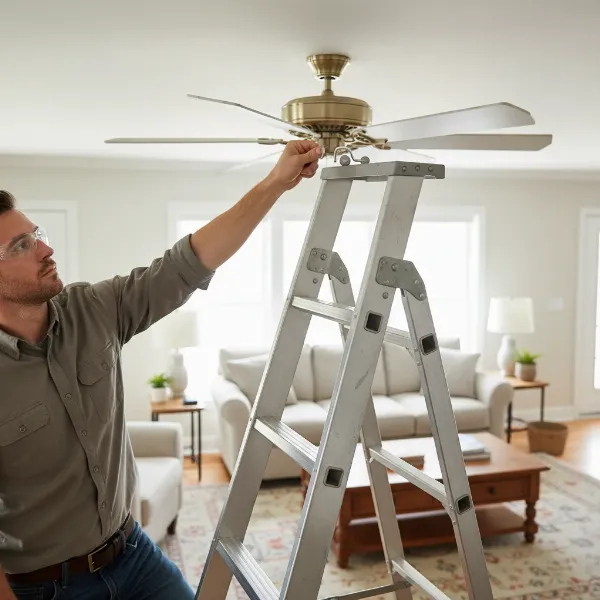 Person using a balancing kit to fix a wobbly ceiling fan blade.
4. Lubricate Bearings (if applicable)
Many modern fans have sealed, “lubricated-for-life” bearings and do not require external lubrication. However, older models or certain industrial fans may benefit from it.
- Check Manual: Always refer to your fan’s manual to determine if lubrication is recommended and what type of lubricant to use.
- Apply Sparingly: If lubrication is advised, use only the recommended type and amount of oil (e.g., a few drops of 3-in-1 motor oil for some models). Over-lubrication can attract more dust and cause further issues.
5. Inspect and Replace Damaged Parts
- Bent Blades: If a blade is significantly bent or warped and cannot be straightened, it should be replaced. Often, replacement blade sets are available from the manufacturer.
- Worn Bearings: If after cleaning and lubricating, the fan still vibrates with a grinding noise, the bearings might be severely worn. Replacing bearings can be a complex task, often requiring specialized tools and expertise.
- Motor Issues: If the motor itself seems to be the source of the vibration, without obvious external causes, it might be nearing the end of its life or require professional repair.
6. Ensure Proper Mounting and Placement
- Secure Installation: For ceiling and wall-mounted fans, confirm that the fan is securely attached to a structural support (e.g., a ceiling joist or a robust electrical box designed for fan weight).
- Stable Surface: For portable fans, ensure they are placed on a firm, level surface. Using anti-vibration mats or rubber feet can help absorb residual vibrations and prevent them from transferring to the furniture.
7. Address Ductwork Issues (for ducted fans)
- Clear Obstructions: If you have a bathroom or kitchen exhaust fan, or an industrial fan connected to ductwork, inspect the ducts for any blockages like accumulated lint, debris, or even small animal nests. Clearing these can restore proper airflow and reduce vibration.
Preventative Maintenance for a Smooth-Running Fan
A little routine care can go a long way in preventing excessive fan vibration and prolonging its life.
- Regular Cleaning: Make it a habit to clean your fan blades and grilles regularly, ideally once a month for frequently used fans, to prevent dust buildup.
- Periodic Fastener Checks: Every few months, quickly check and tighten any accessible screws and bolts on your fan, especially if it’s a ceiling fan or a portable fan that’s moved frequently.
- Proper Storage: When not in use (e.g., during winter months), store portable fans in a clean, dry place, ideally covered to prevent dust accumulation.
When to Call a Professional
While many fan vibration issues are DIY-friendly, there are times when professional help is the safest and most effective option.
- Persistent Issues: If you’ve tried all the troubleshooting steps and the vibration persists, a deeper, more complex issue might be at play.
- Electrical Concerns: Any concerns about exposed wiring, burning smells, or sparks indicate a serious electrical problem that should only be handled by a qualified electrician.
- Complex Motor Problems: If you suspect internal motor damage or severely worn bearings, and you’re not comfortable with intricate repairs, a professional can diagnose and fix these issues safely.
- Safety Risk: If the fan feels unstable, is making very loud grinding noises, or appears to be falling apart, cease use immediately and call a professional.
Conclusion
An excessively vibrating electric fan doesn’t necessarily mean it’s time for a replacement. By systematically investigating common causes like unbalanced blades, loose fasteners, and worn components, you can often diagnose and resolve the issue yourself. Simple steps like regular cleaning, tightening screws, and balancing blades can restore your fan to quiet, efficient operation, saving you money and extending its useful life. Remember, prioritize safety above all else, and don’t hesitate to seek professional assistance if the problem proves too challenging or involves electrical hazards. Will you take on the challenge of quieting your noisy fan, or is it time for an upgrade to a newer, smarter model?
Frequently Asked Questions
What causes a fan to vibrate excessively?
Excessive fan vibration is most commonly caused by unbalanced fan blades due to dust buildup or damage, loose screws or mounting hardware, worn-out motor bearings, or misalignment of the fan’s components. Improper installation or placement on an unstable surface can also contribute to the issue.
How do I balance a wobbly ceiling fan?
To balance a wobbly ceiling fan, first ensure all blade screws and mounting hardware are tight. Then, clean the blades thoroughly. If the wobble continues, use a ceiling fan balancing kit. This typically involves placing a clip on each blade to identify the heaviest one, and then applying a small, self-adhesive weight to the top of that blade to counteract the imbalance until the wobble is reduced.
Can I fix a vibrating desk fan myself?
Yes, you can often fix a vibrating desk fan yourself. Start by unplugging it, then clean the blades to remove any dust. Check and tighten all screws on the blade guard, the central cap holding the blades, and the fan’s base. If it’s still vibrating, consider placing anti-vibration pads or a heavy mat under its base to absorb vibrations.
Is it dangerous if my fan is vibrating loudly?
While minor vibrations might just be an annoyance, excessive or sudden loud vibrations can indicate a serious problem. It could lead to components loosening further, parts breaking off, or motor damage, potentially posing a fire or falling hazard, especially for ceiling fans. It’s best to address excessive vibration promptly to prevent further damage or safety risks.
How can I prevent my fan from vibrating in the future?
Preventing fan vibration involves regular maintenance. Clean your fan blades and grilles periodically to avoid dust buildup. Routinely check and tighten any visible screws or bolts. Ensure portable fans are always placed on a stable, level surface. For installed fans, verify their mounting is secure. These habits can significantly reduce the chances of future vibration issues.