Ceiling fans offer a refreshing breeze and often serve as a room’s primary light source, combining comfort with functionality. However, their installation involves electrical wiring, a task where even minor errors can lead to frustrating malfunctions, safety hazards, or costly repairs. Understanding and avoiding common wiring mistakes is paramount for a safe, efficient, and long-lasting ceiling fan operation. This guide delves into the frequent missteps DIYers and even some professionals encounter, providing clear insights on how to prevent them and ensure your ceiling fan is wired correctly and safely.
Understanding Ceiling Fan Wiring Basics
Before tackling common mistakes, a solid grasp of fundamental ceiling fan wiring principles is essential. At its core, wiring a ceiling fan involves connecting the fan and light kit (if present) to your home’s electrical system, typically through a switch or switches.
Key Components:
- Junction Box: The electrical box in the ceiling where all electrical connections are made. For ceiling fans, this must be a “fan-rated” box, designed to support the fan’s weight and dynamic movement.
- Wires: These transmit electricity. Standard household wiring includes:
- Black (Hot): Carries power from the switch to the fan/light.
- White (Neutral): Carries power back to the electrical panel, completing the circuit.
- Green or Bare Copper (Ground): Provides a safe path for electricity in case of a fault, preventing shocks.
- Blue (often for Light Kit): In configurations with separate fan and light control, a blue wire often powers the light kit independently from the fan motor.
- Switch: Controls the flow of electricity to the fan and/or light. This can be a single switch for both, or dual switches for independent control.
Importance of Safety:
The absolute first step in any electrical work is turning off the power at the circuit breaker. This prevents accidental electrocution or damage to your electrical system. Always verify power is off using a non-contact voltage tester before touching any wires.
Common Ceiling Fan Wiring Mistakes
Navigating the intricacies of ceiling fan wiring can be challenging. Here are some of the most common mistakes and how to prevent them:
1. Using the Wrong Electrical Box
One of the most critical and often overlooked mistakes is using a standard electrical box not rated for ceiling fans. A typical light fixture box is designed to hold only the weight of a light, not the significantly heavier and vibrating load of a ceiling fan.
- Problem: A non-fan-rated box can pull away from the ceiling, causing the fan to wobble excessively, loosen over time, or even fall, posing a severe safety risk and potential damage.
- Solution: Always install a UL-listed, fan-rated electrical box. These boxes are designed to support at least 35 to 50 pounds (15.8 to 22.7 kg), securely attached to a structural beam or a brace between joists. Ensure the box is appropriate for the fan’s weight.
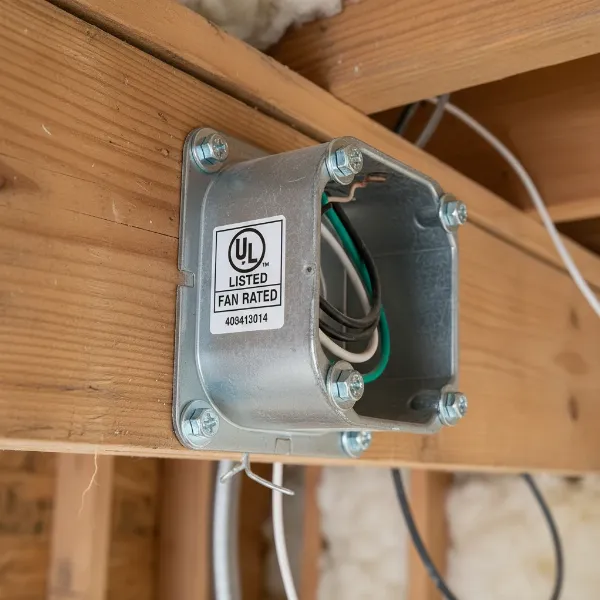 A UL-listed, fan-rated electrical junction box installed securely to a ceiling joist.
2. Incorrect Wire Connections
Misconnecting wires is a primary source of fan malfunctions and safety hazards. Each wire color has a specific role, and mixing them up can lead to a non-functioning fan, short circuits, or electrical shock.
- Problem:
- Mixing up hot, neutral, or ground: Connecting a hot wire where a neutral should be, or vice-versa, can cause the fan to not work, trip breakers, or create dangerous conditions. Using a white wire as a ground is particularly hazardous.
- Improper light kit connections: If your fan has a light kit and it’s not working, or if the fan runs but the light doesn’t, it often points to a mistake with the blue (or sometimes black) light wire.
- Loose connections: Wires not securely fastened in wire nuts or terminals can cause intermittent power, flickering lights, humming, or even overheating, which is a fire hazard.
- Solution:
- Follow color codes rigorously:
- Connect the fan’s green or bare copper ground wire to the house circuit’s bare copper or green ground wire.
- Connect the fan’s white (neutral) wire to the house circuit’s white (neutral) wire.
- Connect the fan’s black (hot) wire to the house circuit’s black (hot) wire.
- If a light kit is present and controlled separately, connect the fan’s blue (light) wire to a separate hot wire from the wall switch (often a red wire from the house wiring if dual switches are used).
- Secure all connections: Use appropriately sized wire nuts, twisting them tightly onto the connected wires. Gently tug each wire to ensure it’s secure and won’t pull out.
- Follow color codes rigorously:
3. Improper Grounding
Grounding is a crucial safety feature that provides a path for electricity to safely dissipate in the event of an electrical fault, preventing shocks.
- Problem: Missing, loose, or incorrect grounding can leave the metal parts of the fan energized if a fault occurs, posing a serious electrocution risk.
- Solution: Always connect the fan’s ground wire (green or bare copper) securely to the ground wire from the house wiring and to the metal junction box itself if it’s a metal box. Never use a neutral (white) wire as a substitute for a ground wire.
4. Overloading Circuits
Connecting a ceiling fan and its light kit to an existing circuit that is already nearing its maximum load can lead to tripped breakers or, worse, circuit overheating.
- Problem: If the fan draws too much power for the circuit, it can trip the breaker, or continuously running an overloaded circuit can degrade wiring insulation and create a fire hazard.
- Solution: Ensure the circuit can handle the combined wattage of the fan motor and light kit. Consult an electrician if you are unsure about your circuit’s capacity or if you need to install a new dedicated circuit for the fan.
5. Incorrect Switch Wiring
The type of wall switch used and how it’s wired significantly impacts the fan’s functionality and safety.
- Problem:
- Using a standard dimmer switch for a fan motor: Regular dimmer switches are designed for lights, not fan motors. Using one with a fan can damage the motor, cause a humming noise, or lead to overheating.
- Improper dual-switch wiring: If you intend to control the fan and light independently but wire them incorrectly, one or both components may not work, or they might operate together instead of separately.
- Solution:
- Use fan-rated controls: If you want speed control for the fan, use a fan-specific speed control switch. If you have a light kit and want to dim it, use a dimmer switch rated for both fan and light (a “combo” switch) or separate fan speed and light dimmer switches.
- Correct dual-switch setup: For independent control, ensure there are two hot wires run to the ceiling box from the switch location. Connect one hot wire to the fan’s black wire and the other hot wire to the fan’s blue (light) wire.
6. Ignoring Manufacturer’s Instructions
Every ceiling fan model is unique, and manufacturers provide specific wiring diagrams and instructions for a reason.
- Problem: Skipping or deviating from the manual can lead to missed connections, incorrect assembly, damage to the fan, or voiding the warranty. This is especially true for smart fans or those with unique DC motors. Wiring a DC motor fan directly to AC power is a common error with severe consequences.
- Solution: Always read the instruction manual thoroughly before starting. Refer to the diagrams and follow the steps precisely, even if you are an experienced DIYer.
7. Not Testing Connections Before Final Assembly
It’s tempting to put everything back together immediately, but thorough testing can save you significant rework.
- Problem: Discovering a wiring mistake after the fan is fully assembled and mounted means taking it all apart again.
- Solution: After making all electrical connections and before securing the fan canopy, temporarily restore power at the breaker. Test the fan and light functions with the wall switch and any remote controls. Once confirmed operational, turn off the power again before completing the assembly.
A Comparative Look at Wiring Scenarios
The complexity of ceiling fan wiring can vary based on whether you have a light kit and the type of wall switch setup you desire. Here’s a brief comparison of common scenarios:
| Feature/Scenario | Single-Switch (Fan & Light Together) | Dual-Switch (Independent Fan & Light) | Remote/Smart Control (Often with single switch) |
|---|---|---|---|
| House Wires to Ceiling | 1 Hot (Black), 1 Neutral (White), 1 Ground (Bare/Green) | 2 Hot (e.g., Black & Red), 1 Neutral (White), 1 Ground (Bare/Green) | 1 Hot (Black), 1 Neutral (White), 1 Ground (Bare/Green) |
| Fan Wires Connected | Fan Black & Blue (light) to House Hot; Fan White to House Neutral; Fan Ground to House Ground | Fan Black to one House Hot; Fan Blue (light) to other House Hot; Fan White to House Neutral; Fan Ground to House Ground | Fan control unit wires to House Hot & Neutral; Fan wires to control unit as per instructions. |
| Complexity | Low | Medium | Medium to High (depending on smart features) |
| Safety Considerations | Ensure correct wire gauge for combined load. | Clearly label wires; ensure correct dimmer/speed controls. | Follow manufacturer’s specific instructions meticulously; ensure good Wi-Fi signal for smart. |
| Control | Both fan and light turn on/off, speed changes simultaneously. | Fan and light operate independently. | Fan speed, light on/off/dimming via remote or app. |
Essential Features and Safety Considerations for Wiring
Beyond basic connections, several features and considerations can influence how you approach ceiling fan wiring, prioritizing safety and performance.
- UL Listing: Always choose a ceiling fan and components (like electrical boxes and switches) that are UL (Underwriters Laboratories) listed. This certification ensures the product meets specific safety standards.
- Integrated Wiring Harnesses: Many modern fans come with pre-wired harnesses, simplifying connections. Ensure these connectors are fully seated and free from damage.
- Remote Control Wiring: Fans with remote controls often come with a receiver unit that needs to be wired into the ceiling box between the house wiring and the fan’s motor/light wires. Follow the specific diagram for the remote receiver carefully.
- Smart Fan Wiring: Smart ceiling fans often integrate with home automation systems. Their wiring usually involves connecting a dedicated receiver or control module. Pay close attention to these instructions, as incorrect wiring can damage the smart components.
- Circuit Breakers: Ensure your home’s electrical panel has appropriately sized circuit breakers to protect the circuit from overcurrent. Never replace a tripped breaker with one of a higher amperage without consulting a professional, as this can create a severe fire hazard.
Your Ceiling Fan Wiring Guide: Pre-Installation Checks and Best Practices
A successful and safe ceiling fan installation begins long before you connect the first wire. Careful planning and adherence to best practices minimize the risk of errors.
Assessing Existing Wiring
- Verify Power Supply: Confirm your ceiling box has a dedicated circuit or enough capacity for a new fan. For independent fan/light control, you need two hot wires (plus neutral and ground) coming to the box. If you only have one hot wire, you’ll need to install a remote control or settle for a single switch controlling both fan and light.
- Check Junction Box: Ensure the existing ceiling box is fan-rated.